Vuex实现记事本功能
本文实例为大家分享了Vuex实现记事本功能的具体代码,供大家参考,具体内容如下
首先:执行命令 安装Vuex
npm install vuex@next --save
在mian.js 中挂在vuex
import store from './store'

new Vue({
 store,
 render: h => h(App)
}).$mount('#app')
这里使用的 Ant Design UI :
npm install ant-design-vue --save
在 main.js 中完整引入
import Antd from 'ant-design-vue'
import 'ant-design-vue/dist/antd.css'
Vue.use(Antd)
App.vue中
<template>
 <div id="app">
  <div>
   <a-input placeholder="请输入任务" class="my_ipt" :value='inputVal'
   @change="handleInputChange"
   />
   <a-button type="primary" @click="addItem">添加事项</a-button>

   <a-list bordered :dataSource="infoList" class="dt_list">
    <a-list-item slot="renderItem" slot-scope="item">
     <!-- 复选框 -->
     <a-checkbox :checked='item.done' @change="changeItem(item.id,$event.target.checked)">{{ item.info }}</a-checkbox>
     <!-- 删除链接 -->
     <a slot="actions" @click="deleteItemById(item.id)">删除</a>
    </a-list-item>

    <!-- footer区域 -->
    <div class="footer" slot="footer">
     <span>{{unDoneNub}}条未完成</span>
     <a-button-group>
      <a-button :type="ViewType=='all''primary':''" @click="changeList('all')">全部</a-button>
      <a-button :type="ViewType=='undone''primary':''" @click="changeList('undone')">未完成</a-button>
      <a-button :type="ViewType=='done''primary':''" @click="changeList('done')">已完成</a-button>
     </a-button-group>
     <a @click="deleteDone">清除已完成</a>
    </div>
   </a-list>
  </div>
 </div>
</template>
<script>
import { mapState, mapGetters } from 'vuex'
export default {
 name: 'app',
 data () {
  return {
   // 模拟数据
   // list: []
  }
 },
 computed: {
  ...mapState(['list', 'inputVal', 'ViewType']),
  ...mapGetters(['unDoneNub', 'infoList'])
 },
 created () {
  this.$store.dispatch('getList')
 },
 methods: {
  handleInputChange (e) {
   console.log(e.target.value)
   // 拿到输入框的值 保存到vuex中
   this.$store.commit('setInputVal', e.target.value)
  },
  // 向列表中添加事项
  addItem () {
   if (this.inputVal.trim().length <= 0) {
    return alert('文本框不能为空')
   }
   // 向store中调用函数 来修改数据 不可以直接修改
   this.$store.commit('addItem')
  },

  // 删除
  deleteItemById (id) {
   // console.log(id);
   this.$store.commit('deleteItem', id)
  },

  // 改变状态
  changeItem (id, e) {
   console.log(id, e)
   // 通过id改变状态
   this.$store.commit('changeItem', id)
  },

  // 清除已完成
  deleteDone () {
   this.$store.commit('deleteDone')
  },

  changeList (type) {
   this.$store.commit('changeList', type)
  }

 }
}
</script>
<style scoped>
#app {
 padding: 10px;
 margin: 0 auto;
 display: flex;
 justify-content: center;
}
.my_ipt {
 width: 500px;
 margin-right: 10px;
}
.dt_list {
 width: 500px;
 margin-top: 10px;
}
.footer {
 display: flex;
 justify-content: space-between;
 align-items: center;
}
</style>
store index.js 中
import Vue from 'vue'
import Vuex from 'vuex'
import axios from 'axios'

Vue.use(Vuex)

export default new Vuex.Store({
 state: {
  list: [],
  inputVal: '',
  id: 10,
  ViewType: 'all'
 },
 // 真正操作数据的地方
 mutations: {
  INITLIST (state, data) {
   state.list = data
  },
  setInputVal (state, data) {
   state.inputVal = data
  },
  addItem (state) {
   const obj = {
    id: state.id,
    info: state.inputVal.trim(),
    done: false
   }
   state.list.push(obj)
   state.id++
   state.inputVal = ''
  },
  // 删除已完成
  deleteDone (state) {
   state.list = state.list.filter(item => {
    return item.done != true
   })
  },
  deleteItem (state, id) {
   state.list = state.list.filter(item => {
    // console.log(item.id);
    return item.id != id
   })
  },
  // 改状态
  changeItem (state, id) {
   // 对应id的done值取反 先拿索引 根据索引 取反对应的状态 如果有多重状态 则需要参数传递
   const index = state.list.findIndex(item => {
    return item.id === id
   })
   if (index !== -1) {
    state.list[index].done = !state.list[index].done
   }
  },
  // 改变列表
  changeList (state, type) {
   state.ViewType = type
   state
  }
 },
 actions: {
  //模仿发送请求
  getList (content) {
   axios.get('./list.json').then(res => {
    console.log(res.data)
    content.commit('INITLIST', res.data)
   })
  }

 },
 modules: {
 },
 getters: {
  // 未完成的数量
  unDoneNub (state) {
   return (state.list.filter(item => {
    return item.done == false
   })).length
  },
  // 根据列表类型 过滤不同的展示列表
  infoList (state) {
   if (state.ViewType == 'all') {
    return state.list
   }
   if (state.ViewType == 'undone') {
    return state.list.filter(item => !item.done)
   }
   if (state.ViewType == 'done') {
    return state.list.filter(item => item.done)
   }
  }
 }
})
list.json
[
  {
    "id": 0,
    "info": "打篮球",
    "done": false
  },
  {
    "id": 1,
    "info": "打王者荣耀",
    "done": true
  },
  {
    "id": 2,
    "info": "学习",
    "done": false
  },
  {
    "id": 3,
    "info": "吃饭",
    "done": false
  },
  {
    "id": 4,
    "info": "睡觉",
    "done": false
  }
]
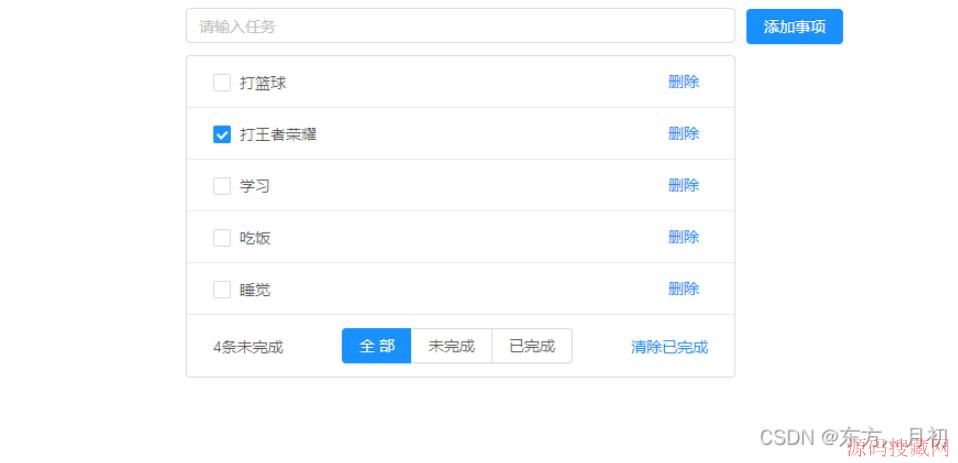
结果图:

以上就是本文的全部内容,希望对大家的学习有所帮助,也希望大家多多支持源码搜藏网。
【JQ】无限滚动条-jquery.infinitescroll.j
query多选下拉框插件 jquery-multiselect(
手机站jQuery自动完成插件autoComplete.js
js/jQuery教程阅读排行
-

【JQ】无限滚动条-jquery.infinitescroll.js使用说明
2014-05-05
-
query多选下拉框插件 jquery-multiselect(修改)
2014-06-15
-
2016-06-15
-
毕向东Html、css、JavaScript视频教程(黑马程序员课程)
2013-04-25
-

手机站jQuery自动完成插件autoComplete.js
2016-02-25
-
2012-08-23
-
2013-04-25
-
2013-04-25
最新文章
-
2022-05-22
-
2022-05-22
-

2022-05-22
-
2022-05-22
-
2022-05-22
-

2022-05-22
-

2022-05-22
-

2022-05-21
热门源码
